 Home
Home Tools
Tools Firmware Update
- Featured
 Firmware updatev1.2
 Flight log uploadv1.1
 Online USB Portalv1.0
 Online USB WiFi configuratorv1.1
- All tools
 3D parts toolv1.0
 Air hole calculatorv1.0
 Altimeter Cloud APIv1.0
 Altitude Predictorv1.0
 Body Tube Strength Calculatorv1.0
 Descent calculatorv1.0
 Ejection Charge Calculatorv1.0
 ESP web programmerv1.0
 Fin Flutter Speed Calculatorv1.0
- Firmware updatev1.2
- Flight log uploadv1.1
 Flight log verificationv1.1
 Laser Cut Parts Designerv1.0
- Online USB Portalv1.0
- Online USB WiFi configuratorv1.1
 Rail Exit Velocity Calculatorv1.0
 Recovery Drift Calculatorv1.0
 Visibility & Tracking Calculatorv1.0
How to prepare your Nano V1 for updating
Connect and enable update mode
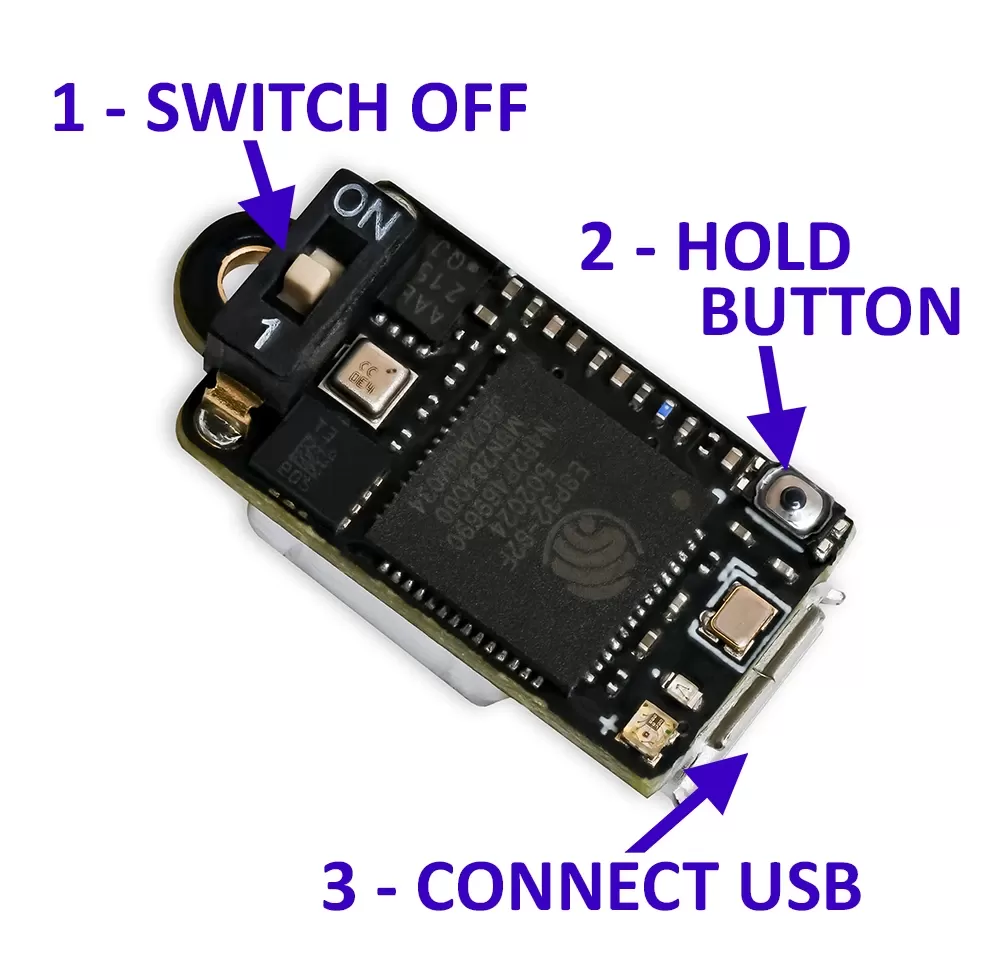 Make sure the power switch is OFF and the USB cable is disconnected. Hold down the small button on your Nano with one hand, and with the other hand connect the USB cable to your PC or laptop. Your Nano is now in boot mode and ready to receive firmware.
The status LED will be off — that's normal in boot mode. The charging LED may still light up, which is fine and just means the USB connection is good.
Tip: It can be easier to plug the cable into the Nano first, then hold the button while you connect the other end to your computer.
Use a supported browser
Web-based firmware updates require Web Serial, which is supported only in desktop Chrome, Edge, Opera, and other Chromium-based browsers. Firefox and Safari will not work.
Mobile browsers probably are not supported either. You must use a PC or laptop.
Use a data USB cable, not a charge-only one
Many USB-C cables, especially short ones bundled with phone chargers, are wired for power only and have no data lines. These will charge your device but cannot communicate with it, so the updater will not be able to detect your device.
If you have problems connecting to your device this is probably why.