Welcome back
Log in to your Altimeter Cloud account
Don't have an account? Create one
Register for a free account
We'll send a confirmation link to verify your email. Check your spam/junk folder if you don't see it.
Already have an account? Log in
 Home
Home Device: 1000-3BF4-4BC2
 Flight ID: 1392
Flight summary
Altitude
Apogee
48.86 Meters
Time to apogee
3.39 seconds
Velocity
Max ascent
174.99 m/s
Max descent
0 m/s
Times
Landing
11.81 seconds
Total recording time
25.732 seconds
User notes
Add this device to your account to edit
Youtube video
No video added
Add this device to your account to edit
Flight images (0)
No images added
Linked rocket
No rocket linked to this flight
Device information
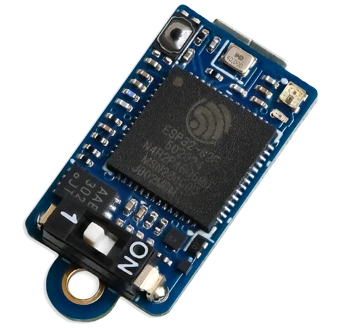
Nano V1
This flight was flown on a Nano V1.
Hardware version
Rev 3
Software version
1.43b
Last online
24/03/26-17:45:13
Pressure sensor
Bosch BMP 390
Flight motors
No motors have been added to this flight
Add this device to your account to edit
Launch site, date & time
Click anywhere on the map to mark your launch site. Switch between map and satellite view using the buttons below.
No results found — try a different search.
Click the map to place a marker · Drag to adjust
Lat—
Lng—
✓ Launch location saved successfully.
✗ Could not save location — please try again.
General flight settings
This is a snapshot of the settings that were used for this flight. pop over to the
pop over to the My devices page and then Configure settings on the device..
Forecast pressure
i
Set this to your local forecast pressure at sea level. This will offer you slightly improved accuracty for your flight, although it's not 100% essential every little helps!
Xcweather.co.uk is a decent place to grab pressures from for your location and time.
Xcweather.co.uk is a decent place to grab pressures from for your location and time.
1013.2 mbar
Launch detect
i
This is the altitude above the launch pad altitude where the altimeter will trigger itself into recording / flight mode.
The altimeter keeps a constant average of the pressure while waiting for launch, it uses a simple algorithm and the pre-flight buffers to do this. The most recent 120 samples (~4 seconds) are ignored so your pre-trigger altitude won't effect the ground baseline.
For almost all uses we suggest keeping this on the 25 Meter (~82 feet) default settings. If you want to test your altimeter by throwing it in the air, or are planning a very low flight you may want to lower the setting.
The altimeter keeps a constant average of the pressure while waiting for launch, it uses a simple algorithm and the pre-flight buffers to do this. The most recent 120 samples (~4 seconds) are ignored so your pre-trigger altitude won't effect the ground baseline.
For almost all uses we suggest keeping this on the 25 Meter (~82 feet) default settings. If you want to test your altimeter by throwing it in the air, or are planning a very low flight you may want to lower the setting.
25 meters
Sample ratio
i
The altimeter runs at 50Hz however you can record every sample or every X samples in order to extend the log time. For example if you set the ratio to 1 it will save 1:1 samples, or if you set it to 3 it will save 1 in 3 samples.
1:1 (50Hz)
Max samples
i
This is the maximum samples the altimeter will log per flight. When it reaches this amount it will stop and save the recording.
35000
Recording stop
i
This setting is how the altimeter decides to stop recording. You can choose either 300 or 600 samples stable or it will record until it's 10000 sample limit unless you press the BUTTON in Manual stop mode.
The samples stable method waits for the devices altitude not to change for the set number of samples. This is defined by not changing by more than +/- 1.0 meters for 98% of the samples, it's a reliable method to stop the recording after landing within 8-10 seconds (300 sample) or 16-20 seconds (600 sample).
The samples stable method waits for the devices altitude not to change for the set number of samples. This is defined by not changing by more than +/- 1.0 meters for 98% of the samples, it's a reliable method to stop the recording after landing within 8-10 seconds (300 sample) or 16-20 seconds (600 sample).
Auto: 300 samples stable
Oversampling
i
Oversampling is a internal setting of the BMP 390 pressure sensor. It is how many samples are taken for each reading. By taking multiple samples for each pressure reading the altimeter reduces noise and increases the resolution of the output.
The sensor can run at 50 samples per second in 4X mode, so we suggest leaving it in this mode as it will offer the highest accuracy.
The sensor can run at 50 samples per second in 4X mode, so we suggest leaving it in this mode as it will offer the highest accuracy.
8x Oversampling
IIR filter
i
The IIR filter is another internal sensor for the BMP390 pressure sensor. It is a Infinite impulse response filter used to enhance pressure measurement accuracy by reducing noise. It's primarily for smoothing out rapid pressure changes.
We suggest not setting this too high as it will cause delay to changes in altitude if set very high.
We suggest not setting this too high as it will cause delay to changes in altitude if set very high.
COEFF 7
Pressure filter
i
This filter is a software Kalman filter that runs on the altimeters processor.
The Kalman filter uses a prediction step based on a system model and then a correction step using new measurements to refine its estimate, it creates accurate most certain results from data with noise in it.
The Kalman filter uses a prediction step based on a system model and then a correction step using new measurements to refine its estimate, it creates accurate most certain results from data with noise in it.
Kalman 1 (less)
Launch lock
i
When enabled, the altimeter locks out recording for a set period after power on to prevent false triggering during setup.
DISABLED
Static temperature
i
A fixed temperature value used for altitude calculation when the external temperature sensor is disabled or not connected.
15 °C
Comments
Comments
Sign in to leave a comment.
Sign in to leave a comment.